Product

One brief.
The whole event.

Describe the event once. SeatCue drafts the task plan, the campaign in your brand, the event page, your sales team's prep and the results report. You edit everything before it goes out.
Event briefDrafting
FormatWorkshop
Date15 Oct 2026, 10:00
AudienceHR leads, 40 guests
Task plan
Campaign
ENBGDEROPL+7
Sales email
Results
01 / Plan

Every deadline, counted back

  • A task plan built from your event type and date, with owners and deadlines counted back from the day itself.
  • Budget lines against each task, so the spend is visible while there is still time to change it.
  • Overdue work flagged, and a warning when you move the date showing exactly which drafts went stale.
  • An agenda drafted from the brief when you don't have one, with realistic session lengths and breaks.
Workshop, 15 OctoberOn track
VenueT−63 SpeakersT−42 CampaignT−21 Sales prepT−7 Event day
8 of 19 tasks
02 / Promote

A campaign written as one set

  • 13 assets for a typical event: announcements, invitations, speaker spotlights, last-call reminders and the thank-you note.
  • Written together rather than one at a time, so asset nine doesn't repeat asset four.
  • In your brand: colours, fonts and tone learned from your website, a brandbook, a deck or a one-pager.
  • In 12 languages, written the way a native speaker writes rather than translated afterwards.
  • Visuals to match, and an event page that looks like your website with your own registration link.
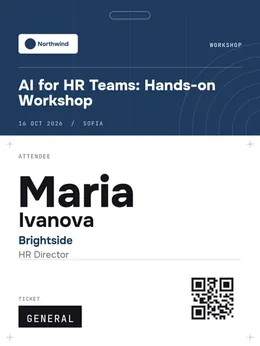
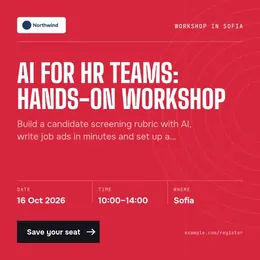
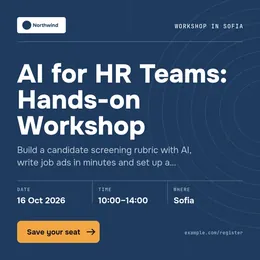
An event post in a red brand kit with a condensed headline font A LinkedIn post announcing an AI workshop, with date, time and venue in the company's brand fonts A printed attendee badge with a QR code
ENBGDEROCSPLLTELESFRITNL
03 / Register

Sign-ups, in your brand

  • Publish a registration page for your event in minutes: choose what to ask, write the consent wording, link your own privacy notice.
  • Share the link from your event page, your posts or an email. People register without creating an account.
  • Everyone who registers lands in your guest list, ready to research, message and check in.
  • Four stages to work through: registered, approved, arrived, didn't arrive. Approval is optional and off unless you turn it on.
  • Your guests' details stay yours. We never contact them, and consent is recorded with each entry.
To: sales team
15 October: invite your top accounts
Open in Gmail
04 / Sell

Sales walks in prepared

  • A one-page brief for the sales team: who is coming, why the event matters, what to say.
  • Talking points per account, and outreach that references the event rather than generic follow-up.
  • Invitations opened as Gmail or Outlook drafts, so nothing goes out unchecked.
  • Follow-up written while it is still fresh, split by whether the person turned up.
To: sales team
15 October: invite your top accounts
Open in Gmail
05 / Campaigns

Selling without an event

  • Describe a product or service instead of an event: what you sell, who buys it, the problem it solves, the proof you have.
  • SeatCue suggests six angles, you pick one, and everything that follows argues that line rather than drifting.
  • You get LinkedIn posts for the company page and for a rep's own profile, a three-email sequence, WhatsApp messages, personal LinkedIn messages, a phone script and a one-page summary.
  • Upload the clients you already have. One board for the whole workspace, split into your own segments, with columns you add and stages you move people through.
  • Ask for companies that match the brief and get a shortlist with the reason, a recent signal and who to approach. Company-level only.
  • Send a one-tap reply link in your own email: they press "count me in", and they move along the board.
To: sales team
15 October: invite your top accounts
Open in Gmail
06 / Report

The proof, in minutes

  • A written summary for leadership: turnout, who came by company and title, cost per lead, what to change.
  • A separate report for each sponsor, with the numbers they were promised.
  • Guest lists, QR check-in, badges and certificates with the guest operations add-on.
31Leads
86% show-up
Brand

It learns your brand once

Point SeatCue at your website, or upload a brandbook, a sales deck or a one-pager. It reads the colours, fonts and tone of voice, and every draft comes out in them.

From your website

Paste the address. It reads the design and the way you write.

From a document

A brandbook, deck, case study or proposal, read once and not stored.

From screenshots

Useful when the site sits behind a login.

Multiple brands

Separate kits for sub-brands or for the companies you work with.

Fit

Keep your tools.
SeatCue does the part they don't.

Registration platforms

What they do
Sign-ups, tickets and check-in.
What SeatCue adds
Plans everything around them. Link your registration page and keep using it.

General AI chat

What they do
Writes one thing at a time and starts from nothing each session.
What SeatCue adds
Holds the event, your brand and every deadline, and writes the campaign as one set.

Spreadsheets and boards

What they do
Track the tasks you remembered to add.
What SeatCue adds
Builds the plan for your type of event, with every date counted back.

Design tools

What they do
Need someone to open them and lay each asset out.
What SeatCue adds
Produces the visuals in your brand, ready to edit if you want to.

What SeatCue doesn't do: sell tickets, run your registration, or send invitations on your behalf. Every draft is yours to approve and send.

Start with your next event

Your first event is free. No card, no call.

Book a demo

30 minutes on one of your real events. We reply within one working day.